
GitLab Android App Features - Complete Guide to Gitalchemy Mobile Development
GitLab Android App Features: The Complete Gitalchemy Guide
GitLab is a desktop-first product, and a phone is the place you are asked to check it. Gitalchemy is a native GitLab client for Android and desktop that carries the work you actually do away from a keyboard: reading your to-dos, triaging issues, reviewing merge requests and watching pipelines. This guide walks through what the app does today, screen by screen.
Why a GitLab Android app matters
Developers and project managers need three things from a phone: to know what is waiting on them, to answer it without a laptop, and to leave the desktop for the deep work. A dedicated GitLab Android app like Gitalchemy covers the first two:
- A to-do list that opens first. GitLab's own to-dos are the row the app puts in front of you.
- Mobile review. Read a diff, answer a thread and approve a merge request from the lock screen queue.
- Pipeline awareness. See a failing job while you are away from your desk.
- Issue triage. Read, filter and edit an issue, and see which of its tasks are done.
Gitalchemy: the GitLab Android client
Gitalchemy is built with Tauri, React and TypeScript, ships under the MIT licence, and installs from F-Droid with no Google account. It talks to gitlab.com and to self-hosted instances, and it signs in with a personal access token.
Projects and repositories
- Project lists across the projects you are a member of, with search, and the ones you starred kept separate on the Home screen.
- Project detail with the repository tree, a Find file filter, the README of the active branch, the last commit on that branch, tags, members and setup links.
- File browsing through folders and nested paths.
Issues and Tasks
- Issue lists with search and a Filters sheet that shows only the filters you narrowed.
- Issue detail with markdown descriptions, labels as coloured chips, assignees, milestone, due date, estimate and spent time, all editable.
- Comments and reactions on the issue and on individual comments, with attachments, image preview and internal notes.
- Child tasks. An issue that has been split into GitLab Tasks shows them in a read-only Tasks section, with each task's state, title and assignees, and a 1 of 3 done count. See GitLab Tasks on Android.
- Linked merge requests for the issue, one tap away.
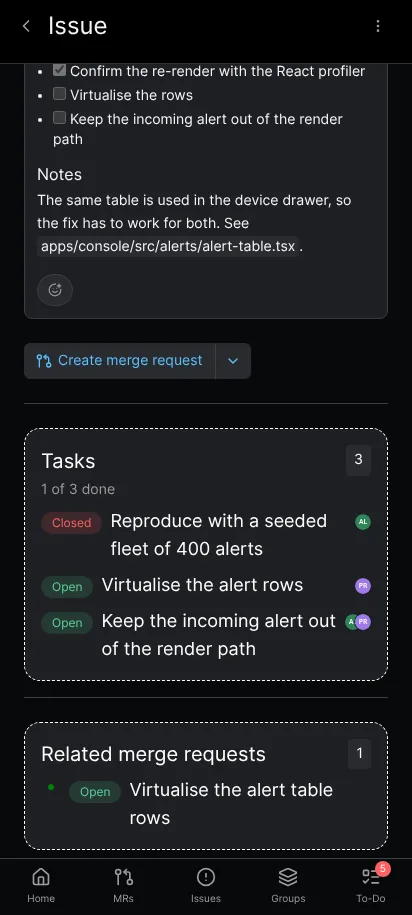
The Tasks section on an issue: each child task's state and assignees, and the completion count.
Merge request review
- Merge request lists with the Review requested queue, so the work waiting on you is one filter away.
- Changes, Commits and Pipelines tabs on the merge request. The tab row scrolls sideways on a narrow phone instead of clipping the last tab, so Pipelines stays reachable at 360 pixels.
- A diff that reads on a phone: added and removed lines are tinted, changed words are highlighted, long lines scroll sideways instead of wrapping, and diffs can be shown side by side.
- Review threads that can be answered, resolved or hidden, and comments on any diff line, held in a Start review flow until you submit them.
- A merge readiness panel that names what still blocks the merge, including merge conflicts and a failing pipeline, with approve, rebase and merge.
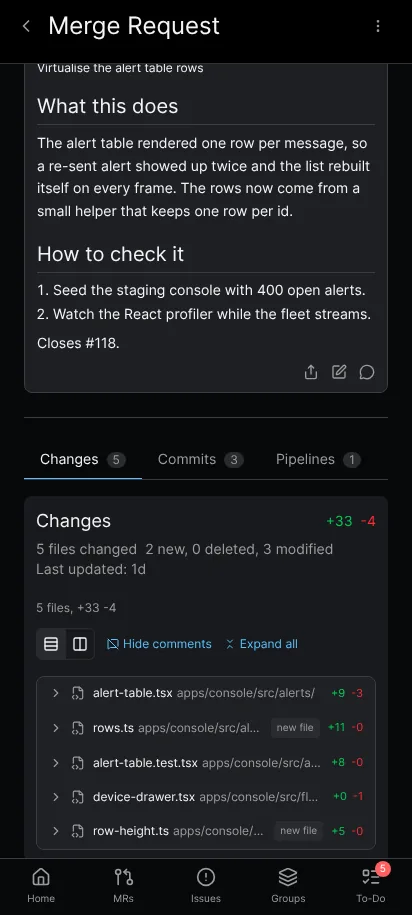
The merge request tab row on a phone: Changes, Commits and Pipelines all stay reachable.
Pipelines, jobs and tests
- Pipeline lists with All, Finished, Branches and Tags scopes and counts.
- Stage dots that jump into a stage's jobs, and a per-row menu to retry, cancel, run a manual job or download artifacts.
- Tests grouped for the pipeline, and job logs that scroll inside their own card.
To-Do List and notifications
- The To-Do List screen shows the GitLab to-dos waiting on you, with a pending count, Mark as done on each row and Mark all done for the list. On a phone it has its own To-Do tab in the bottom navigation.
- Native notifications are produced by polling the GitLab Todos API, not by a push service: there is no Firebase and no Google service in the path, which is what makes the app usable on a de-Googled Android device.
- Background sync on Android runs on WorkManager, so a new assignment reaches you without the app being open. On Android 13 and up the app asks for the notification permission, and its Settings screen offers a button when the permission was refused.
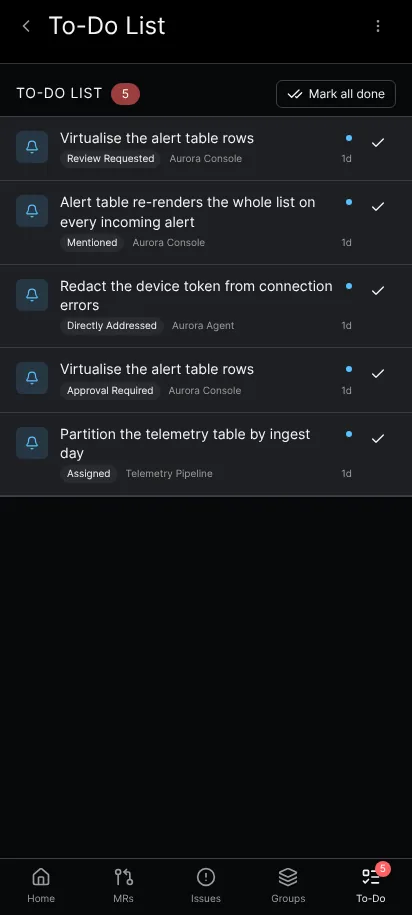
The To-Do List screen: the pending count, Mark all done, and one row per GitLab to-do.
Accounts, search and settings
- Several GitLab accounts at once, each with its own query cache and its own rejected-token handling, and support for self-hosted instances behind a proof-of-work gate.
- Search across projects, issues and merge requests, and a Find file filter inside a repository.
- Settings for the theme, the notification polling interval, which counts the Home rows show, and the interface language: English, French and Arabic, with a right-to-left layout in Arabic.
- A profile screen with your account details and the project's support links.
Installation and setup
Installing from F-Droid gets you automatic updates:
- Open F-Droid and search for Gitalchemy.
- Install it, then open it.
- Create a personal access token in GitLab with the
apiscope and paste it into the sign-in screen. The app links straight to the token page for the instance you name. - Pick the projects you want on the home screen and set your notification preferences.
There is no OAuth flow to configure and no account to create in the app itself.
System requirements
- Android 7.0 (API level 24) or newer: the app's minimum SDK is 24.
- 2 GB of RAM is enough for the lists and the diff viewer.
- 100 MB of storage, and less than half that in practice.
- Network access for every request. A list you already loaded keeps its rows and says they are saved data when a refresh fails, but there is no offline browsing mode.
- Notification permission on Android 13 and up, which the app asks for on first run.
Mobile workflows that work today
- Morning triage. Open the To-Do List, clear what is done, and open the rest.
- Review on the move. Work the Review requested queue, comment on lines and approve, or leave a draft review for later.
- Pipeline watch. Follow a running pipeline from the pipeline screen and retry a job that failed for a flaky reason.
- Issue updates. Change an assignee, a label, a milestone or a due date from the issue screen, and check the child tasks while you are there.
Performance and battery
The app reads GitLab over a pooled connection shared by Android and desktop, renders long lists with only the rows on screen, and caches each account's data in its own query cache. Background notification polling runs on WorkManager, which respects the device's battery and network constraints, and the polling interval is a setting, including Disabled.
How Gitalchemy compares
Against a generic Git client, Gitalchemy speaks GitLab's own API: to-dos, issues, merge requests, pipelines, jobs and work items, not just files. Against GitLab's mobile web interface, it is a native app with a bottom navigation, native notifications and touch-sized controls, and it keeps its own list data between refreshes.
Getting started
- Install Gitalchemy from F-Droid.
- Add a personal access token for gitlab.com or your own instance.
- Open the To-Do List and clear the first item.
- Try one merge request review with the diff and a comment on a line.
- Set the notification polling interval to something that suits your day.
Conclusion
Gitalchemy is a GitLab Android client that covers the mobile half of a GitLab day: the to-dos waiting on you, the issues behind them, the merge requests you have to answer, and the pipelines that decide whether the answer is safe to merge. It is free, open source, and installs from F-Droid.
Ready to try it? Download Gitalchemy from F-Droid and open the To-Do List first.
Related Articles

More from GitLab Fundamentals
Take GitLab with you
Gitalchemy is free and open source. Install it on Android from F-Droid, or on Linux, macOS and Windows from GitLab Releases.
Questions, or want to follow the work? Reach us at contact@gitalchemy.com or star the project on GitLab.