
GitLab Tasks on Android: Child Tasks on the Issue Screen
GitLab lets you break an issue into smaller pieces, and Gitalchemy now shows those pieces on the issue itself. Open an issue that has child tasks and a Tasks section appears, listing every task with its state, its title and the people assigned to it, plus a count of how many are done. The app ships on Android through F-Droid, and the same screen runs on desktop.
What a GitLab Task is
A Task is a GitLab work item: a small unit of work that belongs to a parent issue. You create one when an issue is too large to finish in a single step, or when several people need to own different parts of the same problem. On the GitLab website the tasks sit under the issue's work items, and until now a phone had no way to show them at all.
Where the Tasks section appears
The section lives on the issue screen, under the issue body and its metadata, and above the merge requests that are linked to the issue. It appears only when the issue actually has tasks, so an issue with none looks exactly as it did before.
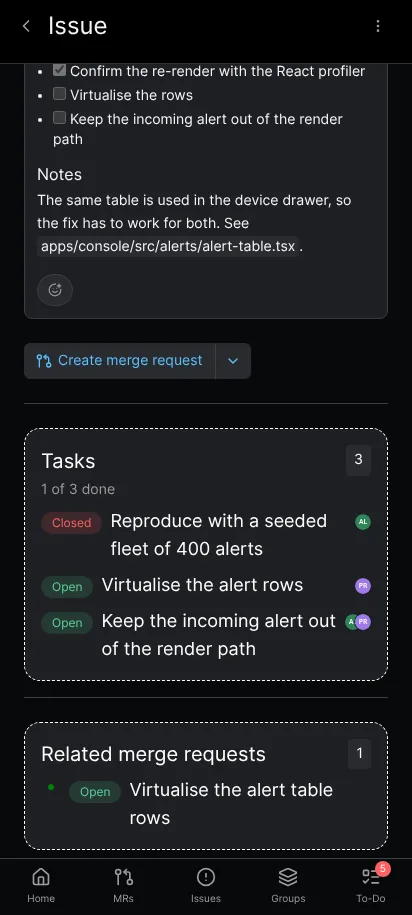
The Tasks section on an issue: three child tasks, each with its state and assignees, and the completion count above them.
Reading the list
Each row shows the task's state as a word, Open or Closed, its title and the avatars of the people assigned to it. An open task is the one to look at next, and a closed one has already been dealt with.
Above the rows, the app counts the whole set. A line such as "1 of 3 done" tells you how far the parent issue has come without opening anything else, which is the summary you want when a colleague asks where the work stands.
Opening a task
Tapping a task opens it as the issue it is, with its own description, comments and events. That link only works while the task lives in the same project as its parent, because the issue screen can only build a route inside the project it is already reading. A task from another project stays listed but is not tappable.
How the app reads the tasks
Tasks are work items, and GitLab exposes them through a query that the REST API used elsewhere in the app does not offer. Gitalchemy asks for the parent issue's children by the project's full path and the issue number, and reads the state, the title and the assignees from the answer.
Nothing is written back. The section is read only, so creating a task or marking one done still happens where you do it today: the app's own task views, or the GitLab website. The section is there to show you the state of the work, not to change it.
When the section does not appear
Tasks are a recent part of GitLab, and an instance can answer that query with an error or not answer it at all. The section is an addition to the issue screen rather than a requirement, so it hides itself in that case and the rest of the issue keeps working. It also hides itself while the answer is on its way, and when an issue has no children at all. If you never see a Tasks section, the issue most likely has no tasks on the instance that answered.
Why it matters on a phone
An issue that has been split into tasks is exactly the issue you cannot hold in your head. On a desktop you might open the work items panel and read the tree, but on a phone the answer has to be short: how many are done, which one is open, and who owns it. The Tasks section answers those three questions on the screen you already opened, without a second navigation step and without a browser.
It also keeps the parent issue honest. A parent issue that looks untouched can still be almost finished if its children are closed, and the count makes that visible the moment the issue opens.
Where to go next
- Tracking issues on Android for the lists and filters that get you to the parent issue.
- Creating and managing issues from the app for the issue fields, labels and comments around the Tasks section.
- Assigning tasks and setting deadlines for handing each piece to the right person.
Related Articles
More from Mobile Workflows
Take GitLab with you
Gitalchemy is free and open source. Install it on Android from F-Droid, or on Linux, macOS and Windows from GitLab Releases.
Questions, or want to follow the work? Reach us at contact@gitalchemy.com or star the project on GitLab.