
Read GitLab Pipeline and Job Logs on Android
You can read GitLab pipelines and job logs on an Android phone with GitAlchemy, a free open source GitLab client. Open a project, tap CI/CD to list its pipelines, open one, tap a job, and the log appears with its colors. A running job updates while you watch. This is the fast way to find out why a build failed when you are away from your desk.
Steps
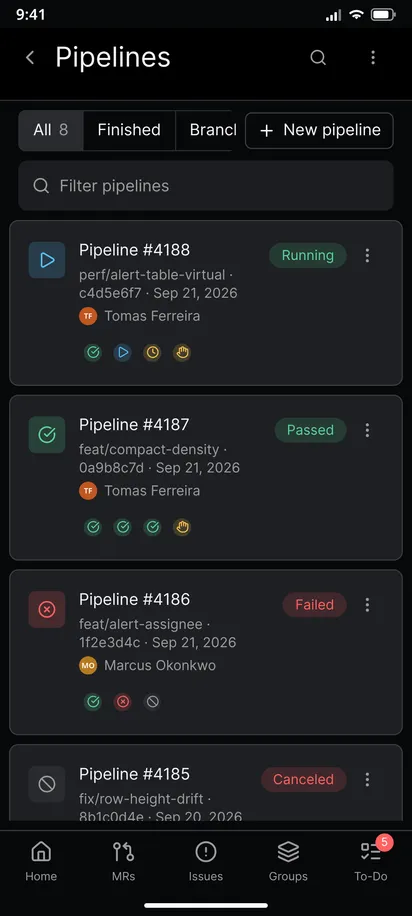
- Open the project and tap CI/CD. The Pipelines screen lists every pipeline with its number, branch, short commit, date, author and status.
- Narrow the list with the tabs. All, Finished, Branches and Tags cut the list down, and the filter box finds a pipeline by name.
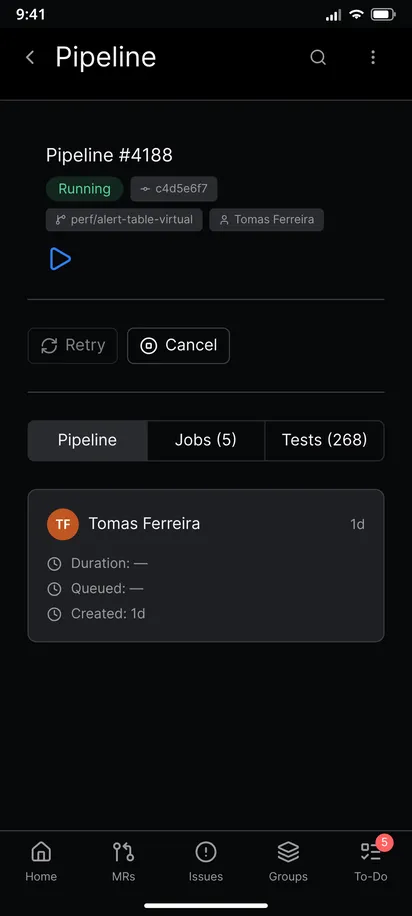
- Tap the failed pipeline. Its screen shows the status, the duration and the jobs grouped by stage.
- Find the red job. Jobs are listed under their stage names such as build and test, so the failed stage is easy to spot.
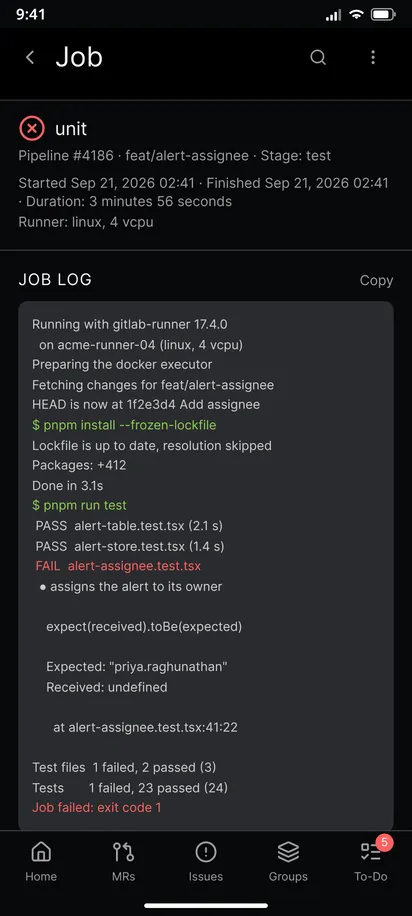
- Tap the job. The Job Log opens in a scrollable box. Colors from the CI output are kept, so errors and warnings stand out.
- Scroll to the end of the log. The first error is usually near the last red lines, and the lines above it tell you what ran just before.
- Tap Copy to put the whole log on the clipboard and paste it into a chat or a comment.
- Open the test report from the pipeline screen when the pipeline publishes one. It lists failed tests without making you read the whole log.
Watch a running job
A job that is still running refreshes its status and its log on its own. A new job with no output says that it has no log yet. A finished pipeline stops refreshing, so a quiet screen is not a frozen screen. If a job hangs, go to retry or cancel a pipeline.
Read the pipeline of a merge request
You do not have to start from the project. A merge request has a Pipelines tab, and the readiness panel shows the latest pipeline. Open the pipeline from there, read the log, then go back to the review. That is the shortest path when a red pipeline is the only thing between you and a merge.
A tip for long logs
The log box has a fixed height and scrolls inside the page, so scroll with one finger inside the box and drag outside it to move the page. For a very long log, copy it and read it in a text editor or search it on a computer. The app does not search inside a log.
Limits
- The log is text. There is no download of the raw trace file in the app, but Copy gives you the same content.
- Pipelines that only your teammates can see stay hidden from you, as in the browser. GitLab decides what a token may read.
- Retrying and cancelling need the
apiscope. The app asks for that scope at sign-in, andread_apiis not enough for what it does. See how to sign in with a personal access token.
Related
This is one step of the GitAlchemy for Android walkthrough. Once you know why a job failed, retry or cancel the pipeline from the same screen, or send the fix through a merge request review.
FAQ
Can I be told when a pipeline fails?
The app notifies you about your GitLab to-dos, and GitLab adds a to-do when a pipeline for your merge request fails. Read how notifications work without Firebase.
Does it work with self-hosted runners?
The runner does not matter. The app reads what GitLab stores, so logs from shared and self-hosted runners look the same.
Related Articles
More from GitLab Fundamentals
Take GitLab with you
Gitalchemy is free and open source. Install it on Android from F-Droid.
Questions, or want to follow the work? Reach us at contact@gitalchemy.com or star the project on GitLab.